

sample_depth_estimation sample application takes an RGB image named input_image.jpg or the /cam0_stream1 ROS topic from qrb_ros_camera. It runs model inference with the Qualcomm AI Engine Direct SDK (QNN) and publishes the result as the /depth_map ROS topic containing per-pixel depth values.
The model has its source from Depth Anything V2, a deep convolutional neural network model for depth estimation.
The following figure shows an example depth estimation result.
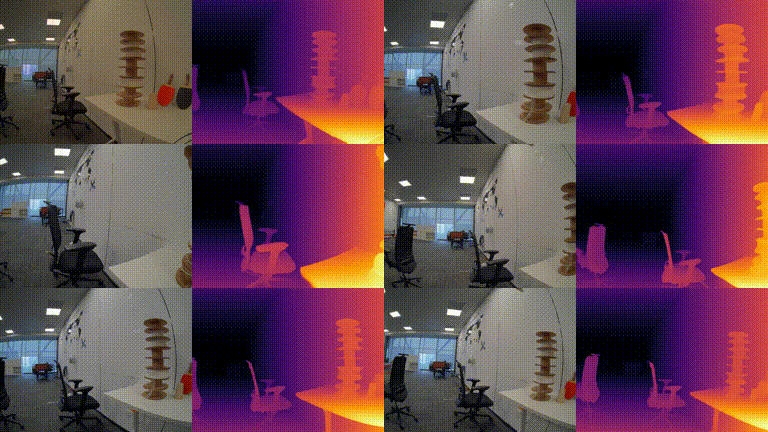
sample_depth_estimation pipeline flow
The following figure shows the pipeline flow for sample_depth_estimation.

sample_depth_estimation pipeline.
ROS nodes used in sample_depth_estimation
The following table lists the ROS nodes used in sample_depth_estimation.
ROS topics used in sample_depth_estimation
The following table lists the ROS topics used in sample_depth_estimation.
Prerequisites
You have set up the device, installed ROS2 Jazzy and Qualcomm Intelligent Robotics (QIR) SDK on the device according to Install the QIR SDK.Build from the source of sample_depth_estimation
Build sample_depth_estimation from source when you need to change the sample code. The device steps install the dependencies, clone the source repository, and build the package.
Device steps
1
Download the Depth-Anything-V2 model
Download the model
2
Install dependencies
Install the dependencies
3
Download the source code from the qrb_ros_samples repository
Download the source code
4
Build the sample application from source code
Build the sample application
5
Set up the environment with the source command and launch the sample application
Launch the sample application
6
You can replace this with a custom image file or model path
Launch with a custom image and model
7
You can also launch with qrb_ros_camera if you connect to the GMSL camera
Launch with qrb_ros_camera
8
When using this launch script, it uses the default parameters, which send the local input_image.jpg file with a publishing rate of 10 Hz
9
You can then check ROS topics with the topic name /depth_map in rqt
To install
rqt, see the ROS 2 Jazzy documentation.a. Run rqt and select the following buttons in sequence: Plugins --> Visualization --> Image View.b. Select /sample_container/depth_map to see the results.