

- Waypoint and virtual path management on the map.
- Path following navigation to target waypoints.
- Obstacle avoidance during path following.
Software structure
The following figure shows the software structure of theqrb_ros_follow_path service:
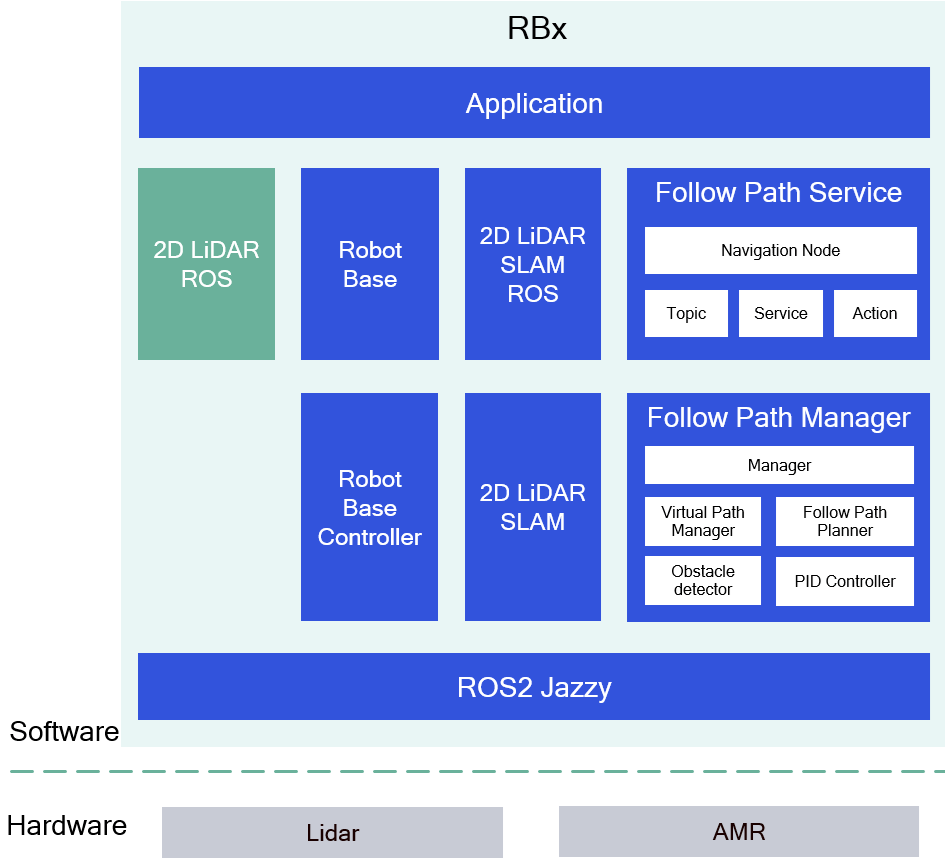
Software structure of qrb_ros_follow_path.
ROS nodes and modules used in the qrb_ros_follow_path service
The following table describes the ROS nodes and modules used in the qrb_ros_follow_path service.
qrb_ros_follow_path_service APIs
The following table describes the qrb_ros_follow_path_service APIs.
Prerequisites
You have set up the device, installed ROS2 Jazzy and the Qualcomm Intelligent Robotics (QIR) SDK on the device according to Install the QIR SDK.Run out-of-the-box qrb_ros_follow_path service
Run the following commands on the device unless otherwise specified.
1
Install the qrb_ros_follow_path service packages
2
Set up 2D lidar SLAM
Set up 2D lidar SLAM by completing the steps 1-6 in Run out-of-the-box 2D lidar SLAM. Ensure that the mapping is completed.
3
Set up the sample environment on the device
4
Test the follow-path service
-
You can implement a ROS node according to the
qrb_ros_follow_path_serviceAPIs table to complete the follow-path navigation. - You also can use these ROS commands to complete the follow-path navigation.
rqt-robot-steering on the host computer (Ubuntu 24.04).rqt-robot-steering on the host computer.rqt_robot_steering to move the robot base to an expected position.d. Install and set up rviz2 on the host computer (Ubuntu 24.04).rviz and convert the pose to a 2D position (x,y,angle).f. Add a waypoint with the current position.For example, if the current position is (0.1, 0.3, 3.0), use the following command:rqt_robot_steering to move the robot base to another position.h. Get the pose from rviz and convert the pose to a 2D position (x,y,angle).i. Add a waypoint with the current position.For example, if the current position is (0.3, 0.1, 3.0), use the following command:Build from source and run the follow-path service
Build the follow-path service from source when you need to change the service code. The device steps install the dependencies, clone the source repositories, build the packages, and run the result.
Device steps
1
Install the dependencies
2
Download and build
3
Run and test the service
Run and test according to step 2 to step 4 of Run out-of-the-box
qrb_ros_follow_path service.