

localhost and invoke a structured tool call — no manual configuration required.
127.0.0.1 only.How It Works
When enabled, the extension starts an HTTP server onlocalhost.
Configuration
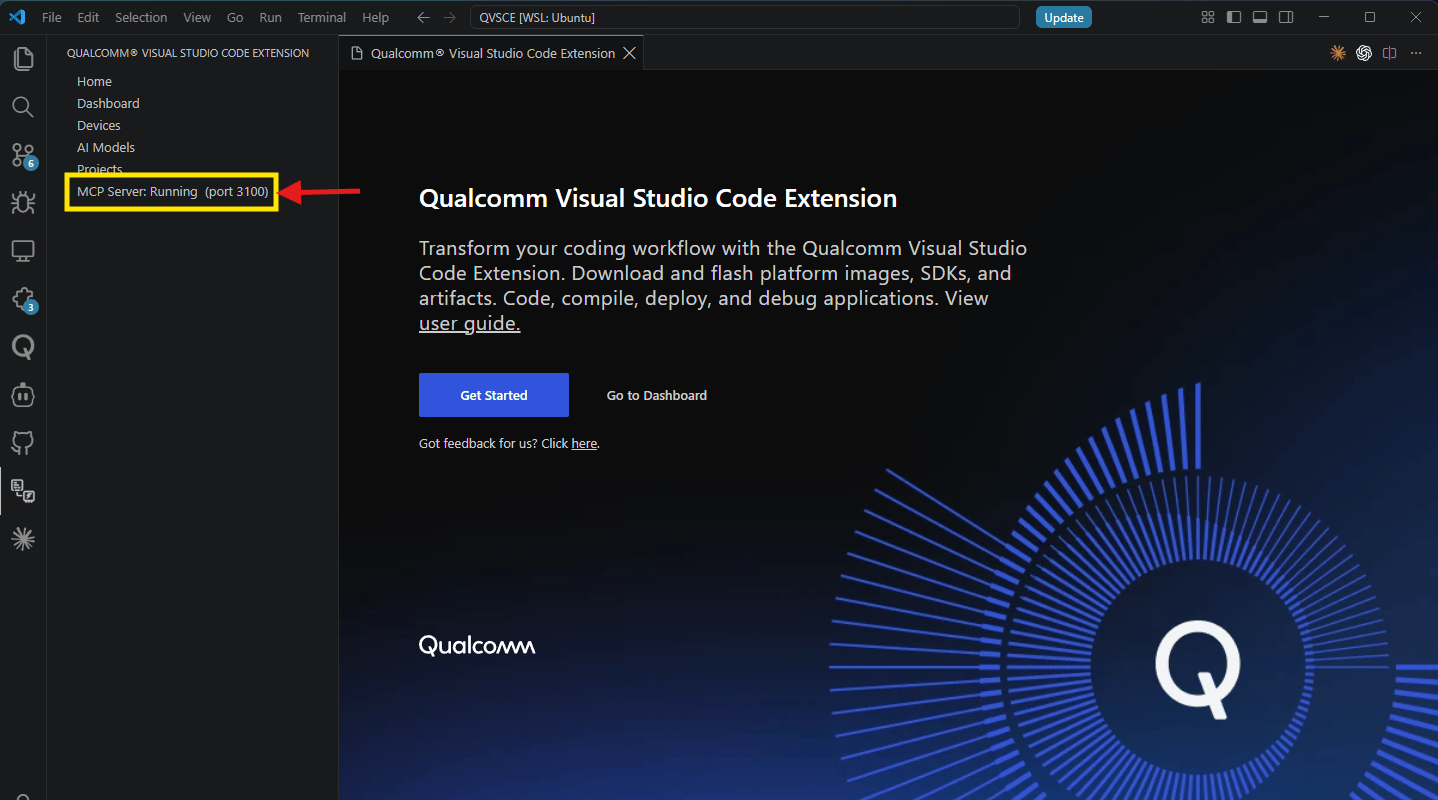
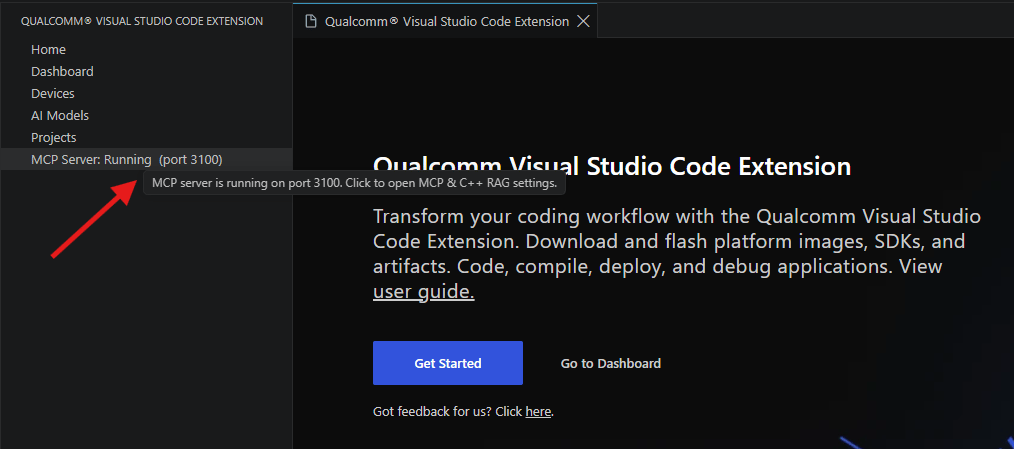
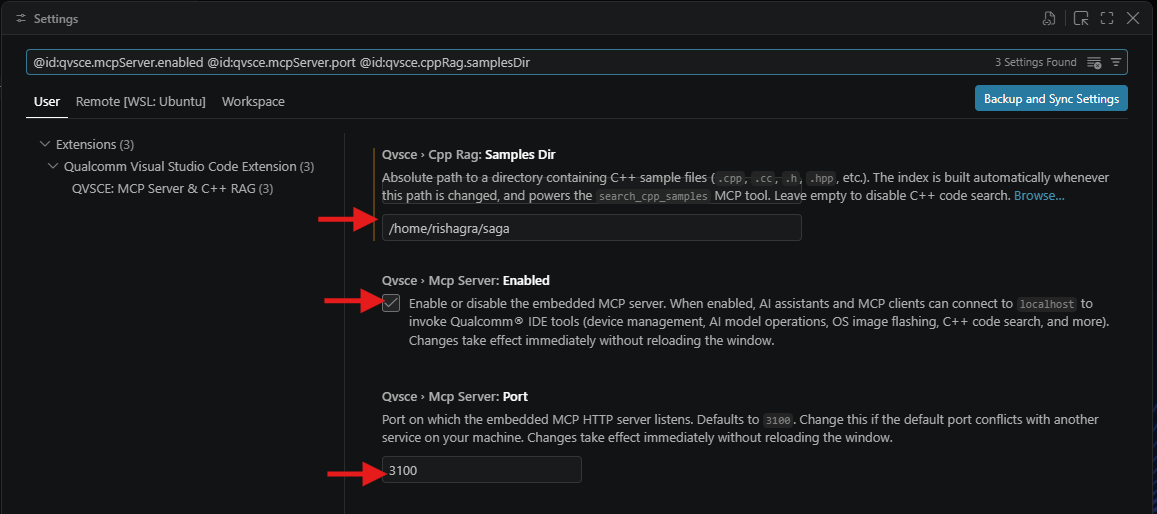
The sidebar shows MCP Server: Running (port 3100) when active. Click this label to open the MCP & C++ RAG settings directly. Alternatively, Open VS Code Settings and search for@id:qvsce.mcpServer.enabled @id:qvsce.mcpServer.port @id:qvsce.cppRag.samplesDir to see all three MCP-related settings in one view.
Connecting an AI Client
Any MCP-compatible AI assistant can connect to the server. The general pattern is the same across clients: point it athttp://127.0.0.1:3100/mcp using the Streamable HTTP transport.
Confirm the server is running
qvsce.mcpServer.enabled).Configure your AI client
- Claude Desktop / Claude Code
- Codex CLI
- Other clients
claude_desktop_config.json (Claude Desktop) or .claude/mcp.json (Claude Code in a project):Verify the connection
Available Tools
The server exposes tools across nine functional categories. The tool set continues to evolve — to see the latest available tools, ask your AI assistant: “What MCP tools are available from the Qualcomm IDE?” Click a category below to jump to its tool reference. Tools marked Linux-only are unavailable on Windows-native VS Code (WSL remote connections are supported).Device Management
Projects
C++ Code Search
Documentation
AI Models
SDKs & OS Images
Skills Hub
Overlay Configuration
Delta Flash
Device Management
These tools give AI assistants full visibility and control over connected Qualcomm hardware. Most other tool categories depend on an active device being selected first.list_devices — List all connected devices
list_devices — List all connected devices
get_active_device — Get the selected device
get_active_device — Get the selected device
select_device — Set the active device
select_device — Set the active device
add_device_via_ssh — Add a device over SSH
add_device_via_ssh — Add a device over SSH
validate_ssh_connection — Check SSH reachability
validate_ssh_connection — Check SSH reachability
update_ssh_config — Edit SSH configuration
update_ssh_config — Edit SSH configuration
list_wifi_networks / connect_wifi / disconnect_wifi / get_wifi_status — Wi-Fi management
list_wifi_networks / connect_wifi / disconnect_wifi / get_wifi_status — Wi-Fi management
reboot_device — Reboot a device
reboot_device — Reboot a device
flash_device_software — Flash an OS image (Linux-only)
flash_device_software — Flash an OS image (Linux-only)
apply_camx_overlay — Apply CamX overlay (Linux-only)
apply_camx_overlay — Apply CamX overlay (Linux-only)
flash_device_software signals
it is awaiting the overlay step. Requires Qualcomm Linux Proprietary v2.0+.list_devkit_catalog — Browse supported devkits
list_devkit_catalog — Browse supported devkits
get_pre_flash_data — Pre-flash instructions
get_pre_flash_data — Pre-flash instructions
get_auto_activate_status / update_auto_activate — Auto-activation control
get_auto_activate_status / update_auto_activate — Auto-activation control
reset_device_selection — Clear the active device
reset_device_selection — Clear the active device
remove_device — Remove a known device
remove_device — Remove a known device
provision_ufs / program_cdt — Low-level provisioning (Linux-only)
provision_ufs / program_cdt — Low-level provisioning (Linux-only)
Projects
Build, deploy, and run applications directly from an AI conversation. The full workflow — from project creation to on-device execution — is available as tool calls.build_project — Build (Linux-only)
build_project — Build (Linux-only)
qvsce-build task. Supports a headless mode that accepts
projectPath and sdkId directly — no open VS Code window required.deploy_project — Build and deploy (Linux-only)
deploy_project — Build and deploy (Linux-only)
run_project — Run on-device (Linux-only)
run_project — Run on-device (Linux-only)
import_sample_project — Import from SDK (Linux-only)
import_sample_project — Import from SDK (Linux-only)
create_project — New project from template (Linux-only)
create_project — New project from template (Linux-only)
.vscode with tasks.json, launch.json, and
c_cpp_properties.json.register_project — Register an existing project
register_project — Register an existing project
.vscode configuration files needed to build and debug it.update_preferred_sdk — Switch the active SDK
update_preferred_sdk — Switch the active SDK
C++ Code Search (RAG)
The extension maintains a local TF-IDF index of C++ code samples that AI assistants query automatically when writing or explaining code.search_cpp_samples — Search for C++ code
search_cpp_samples — Search for C++ code
build_cpp_rag_index — Build the search index
build_cpp_rag_index — Build the search index
qvsce.cppRag.samplesDir. A built-in default index is always present; user
samples are merged on top. Returns the total chunk and vocabulary counts on
completion.get_cpp_rag_stats — Index statistics
get_cpp_rag_stats — Index statistics
qvsce.cppRag.samplesDir and run
build_cpp_rag_index individually. Teams can share the same source directory
(for example, via a shared repository) to achieve consistent results, but the
index build must be performed locally by each developer.Documentation Search
The assistant calls these tools automatically — on tool failures, before complex operations, and whenever you ask about IDE features.search_documentation — Search IDE docs
search_documentation — Search IDE docs
get_documentation — Retrieve a specific page
get_documentation — Retrieve a specific page
AI Models
Full integration with Qualcomm AI Hub for cloud profiling and compilation, plus local on-device benchmarking.list_ai_model_catalog — Browse the AI Hub catalog
list_ai_model_catalog — Browse the AI Hub catalog
download_ai_model — Download a model
download_ai_model — Download a model
get_ai_model_status — Model status overview
get_ai_model_status — Model status overview
push_ai_model_to_device — Flash a model to hardware
push_ai_model_to_device — Flash a model to hardware
profile_ai_model — Cloud profiling via AI Hub
profile_ai_model — Cloud profiling via AI Hub
local_profile_ai_model — On-device profiling
local_profile_ai_model — On-device profiling
get_ai_model_profile_result / get_ai_model_local_profile_result — Retrieve results
get_ai_model_profile_result / get_ai_model_local_profile_result — Retrieve results
compile_ai_model — Compile and customize a model
compile_ai_model — Compile and customize a model
get_ai_model_benchmark — Benchmarking data
get_ai_model_benchmark — Benchmarking data
import_ai_model — Import a local model file
import_ai_model — Import a local model file
remove_ai_model — Remove a model
remove_ai_model — Remove a model
list_ai_model_device_types — Supported device types
list_ai_model_device_types — Supported device types
SDKs and OS Images
Typically used once during environment setup — browse catalogs, download, and install the SDK and OS image for your devkit.download_devkit_software — Bundle download
download_devkit_software — Bundle download
list_sdk_catalog — Browse available SDKs
list_sdk_catalog — Browse available SDKs
download_sdk / get_sdk_status / install_sdk — SDK lifecycle
download_sdk / get_sdk_status / install_sdk — SDK lifecycle
list_os_image_catalog — Browse OS images
list_os_image_catalog — Browse OS images
download_os_image / get_os_image_status — OS image download
download_os_image / get_os_image_status — OS image download
Skills Hub
Browse and install agent skills that extend what AI assistants can do with the extension.search_skills — Find relevant skills
search_skills — Find relevant skills
download_skill — Install a skill
download_skill — Install a skill
get_skill_documentation — Read a skill's SKILL.md
get_skill_documentation — Read a skill's SKILL.md
list_skills — Full catalog
list_skills — Full catalog
delete_skill — Uninstall a skill
delete_skill — Uninstall a skill
refresh_skills_catalog — Force catalog refresh
refresh_skills_catalog — Force catalog refresh
Overlay Configuration
Advanced configuration for Qualcomm Linux devices — inspect and switch device overlays over SSH.get_overlay_configuration — Read overlay options
get_overlay_configuration — Read overlay options
apply_overlay_configuration — Apply overlay selections
apply_overlay_configuration — Apply overlay selections
Delta Flash (Incremental Deploy)
Incrementally sync build artifacts to a device over SSH — faster than a full reflash when only a few files changed.preview_delta_flash — Dry-run rsync
preview_delta_flash — Dry-run rsync
rsync --dry-run to report exactly which files would be transferred.
No changes are made to the device. Linux and macOS only.apply_delta_flash — Apply incremental deploy
apply_delta_flash — Apply incremental deploy
depmod) and reboots the device.
Linux and macOS only.Troubleshooting
AI assistant cannot find any tools
AI assistant cannot find any tools
http://127.0.0.1:<port>/mcp (not /sse or the root path). The server uses the Streamable HTTP transport, not the legacy SSE-only transport.search_cpp_samples returns no results
search_cpp_samples returns no results
qvsce.cppRag.samplesDir setting may be empty or pointing to a directory with no .cpp/.h files. Set it to a valid path and call build_cpp_rag_index to populate the index.Linux-only tools fail on WSL
Linux-only tools fail on WSL