

-
The low-speed I/O interfaces operate at a lower frequency than the high-speed interfaces in the SoC. The Qualcomm universal peripheral (QUP) v3 serial engine is a hardware core that supports the following low-speed peripheral interfaces:
- Universal asynchronous receiver/transmitter (UART)
- Serial peripheral interface (SPI)
- Interintegrated circuit (I2C)
- Improved interintegrated circuit (I3C)
- The high-speed I/O interfaces include the following peripheral interfaces: The high-speed I/O interfaces are used to connect to high-speed devices, such as solid-state drives, network cards, external graphics cards.
Peripheral interfaces software stack
The following figure shows the software stack for peripheral interfaces.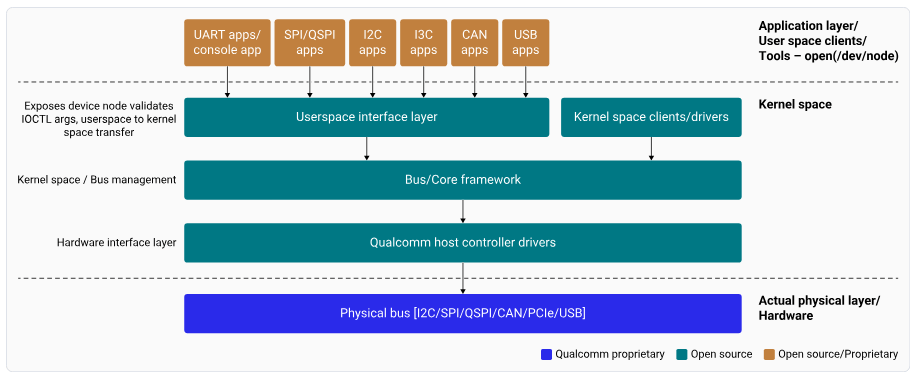
/dev nodes or subsystem APIs. The flow works as follows:
-
Application layer
- An application issues a request using a standard user-space interface.
- The request enters the kernel through a system call.
-
Kernel core framework
- The kernel routes the request to the relevant subsystem, such as:
- I2C
- SPI
- I3C
- TTY
- The subsystem performs the following functions:
- Provides protocol-aware abstractions
- Manages synchronization and concurrency
- Integrates power-management hooks
- Offers a uniform programming interface to clients
- The kernel routes the request to the relevant subsystem, such as:
-
Protocol controller driver
- The core framework calls the protocol controller driver.
- The driver translates framework-level operations into hardware-specific commands.
-
QUPv3 GENI Serial Engine (Qualcomm platforms)
- The controller driver programs the QUPv3 GENI serial engine.
- GENI implements the selected protocol (I2C, SPI, I3C, or UART) using:
- Configured transfer modes
- Protocol firmware
-
GENI hardware execution
- Performs register-level operations.
- Moves data between the system and the external device.
- Driver and device lifecycle management
- Concurrency handling
- Power state coordination across the stack
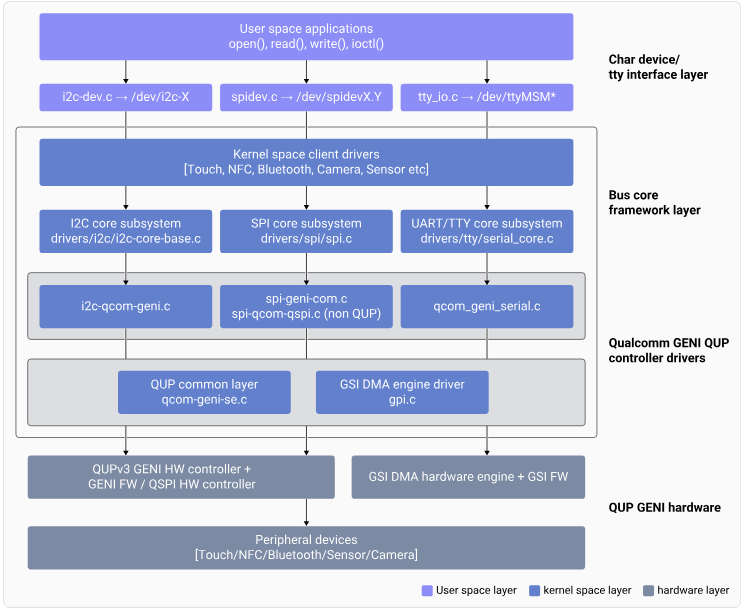
QUP v3
Qualcomm uses QUP v3, a highly flexible and programmable hardware to support a wide range of serial interfaces. For more information about QUP v3, see the following resources:- QUP v3 overview
- Supported transfer modes in QUP v3
- QUP v3 access control customization
- QUP v3 firmware status verification
Note
- The source code for boot and aDSP subsystems is available to licensed developers with authorized access.
- See Hardware SoCs that are supported on Qualcomm Linux.
NoteAcross this guide,
<chipset> refers to QCS6490, QCS5430, Qualcomm Dragonwing™ IQ-9075, Qualcomm Dragonwing™ IQ-8275, Qualcomm Dragonwing™ IQ-615, Qualcomm Dragonwing™ IQ-X7181, Qualcomm Dragonwing™ IQ-X5121, Qualcomm Dragonwing™ Shikra, or Qualcomm Dragonwing™ IQ10 Nord. The corresponding device-tree sources are listed below:- QCS6490/QCS5430: qcs6490-rb3gen2.dts
- IQ-9075: lemans-evk.dts
- IQ-615: talos-evk.dts
- IQ-X7181: hamoa-iot-evk.dts
- IQ-X5121: purwa-iot-evk.dts
- Shikra: shikra-iqs-evk.dts, shikra-cqm-evk.dts