

Pipeline flow for qrb_ros_system_monitor
The following figure shows the pipeline flow, which collects system information with the sysfs node and some system standard command tools and then publishes these data with ROS messages.
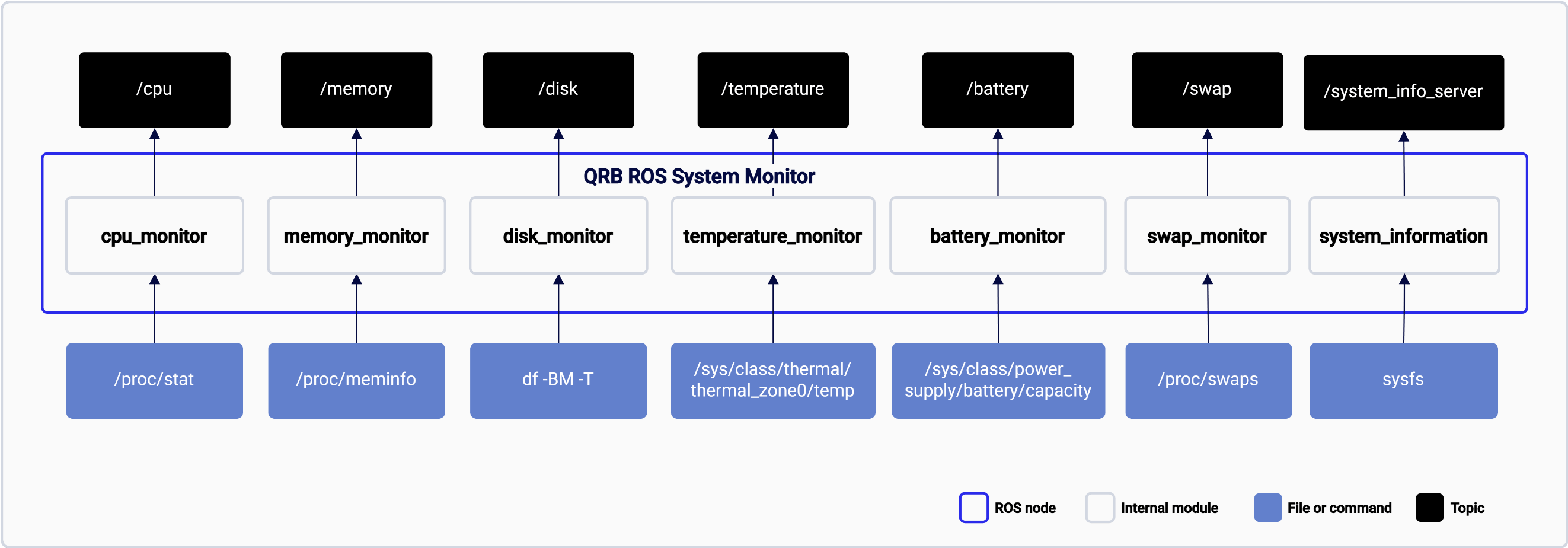
The qrb_ros_system_monitor pipeline.
ROS nodes used in the qrb_ros_system_monitor pipeline
The following table lists the ROS nodes used in the qrb_ros_system_monitor pipeline and describes what each node publishes.
ROS topics used in the qrb_ros_system_monitor pipeline
The following table lists the ROS topics used in the qrb_ros_system_monitor pipeline, with the message type and a description of each topic.
ROS services used in the ROS topics used in qrb_ros_system_monitor pipeline
The following table lists the ROS services used in the qrb_ros_system_monitor pipeline, with the service type and a description.
Prerequisites
You have set up the device, installed ROS2 Jazzy and the Qualcomm Intelligent Robotics (QIR) SDK on the device according to Install the QIR SDK.Run out-of-the-box qrb_ros_system_monitor
1
In terminal 1, run qrb_ros_system_monitor
Run the system monitor
2
In terminal 2, get the topics of this node and check system status as needed
List the topics and echo the system status