

Pipeline flow for ocr_service
The following figure shows the pipeline flow among the relevant client/server and ROS nodes, with the basic messages and data transfer channels.
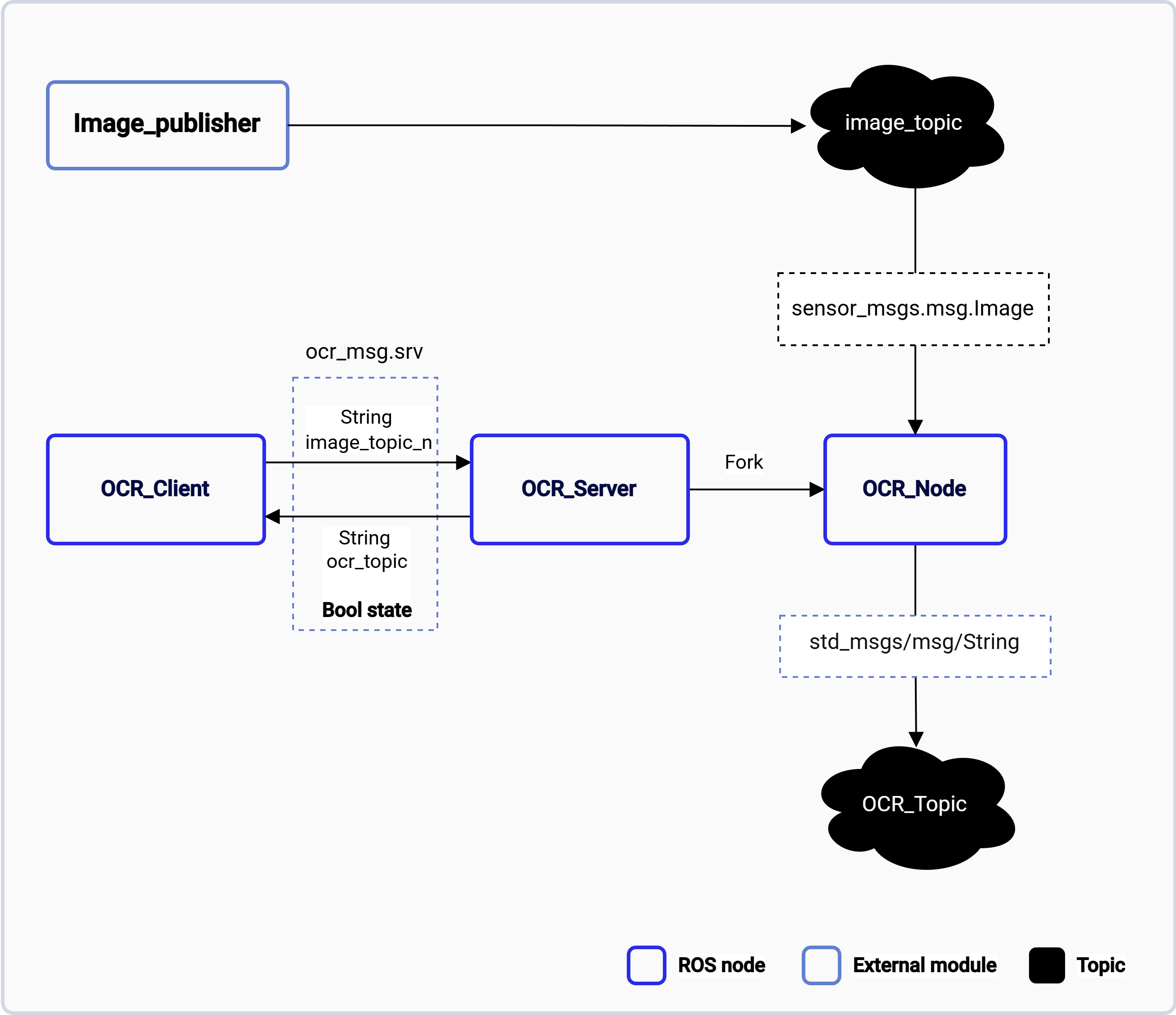
The ocr_service pipeline.
ROS nodes used in the ocr_service pipeline
The following table lists the ROS nodes used in the ocr_service pipeline and describes what each node does.
ROS topics used in the ocr_service pipeline
The following table lists the ROS topics used in the ocr_service pipeline, with the message type and the publisher of each topic.
Prerequisites
You have set up the device, installed ROS2 Jazzy and the Qualcomm Intelligent Robotics (QIR) SDK on the device according to Install the QIR SDK.Run out-of-the-box ocr_service
Run ocr_service with the following commands:
Run ocr_service
Example
This example shows the commands you can run in the three terminals:-
In terminal 1:
Start the OCR server
-
In terminal 2:
Publish a test image
-
In terminal 3:
Run the OCR client