

- QRB ROS Audio Service: A ROS node that creates a service server, responds to requests from the application, and translates them into operations on the Audio Manager.
- QRB ROS Audio Common: A ROS node that acts as a bridge between QRB ROS Audio Service and QRB Audio Common Lib.
- QRB Audio Manager: Executes audio operations provided by the Audio Service, based on stream configurations.
- QRB Audio Common Lib: Provides audio functionalities by calling PulseAudio APIs.
Pipeline flow
The following figure shows the pipeline flow forqrb_ros_audio_service.
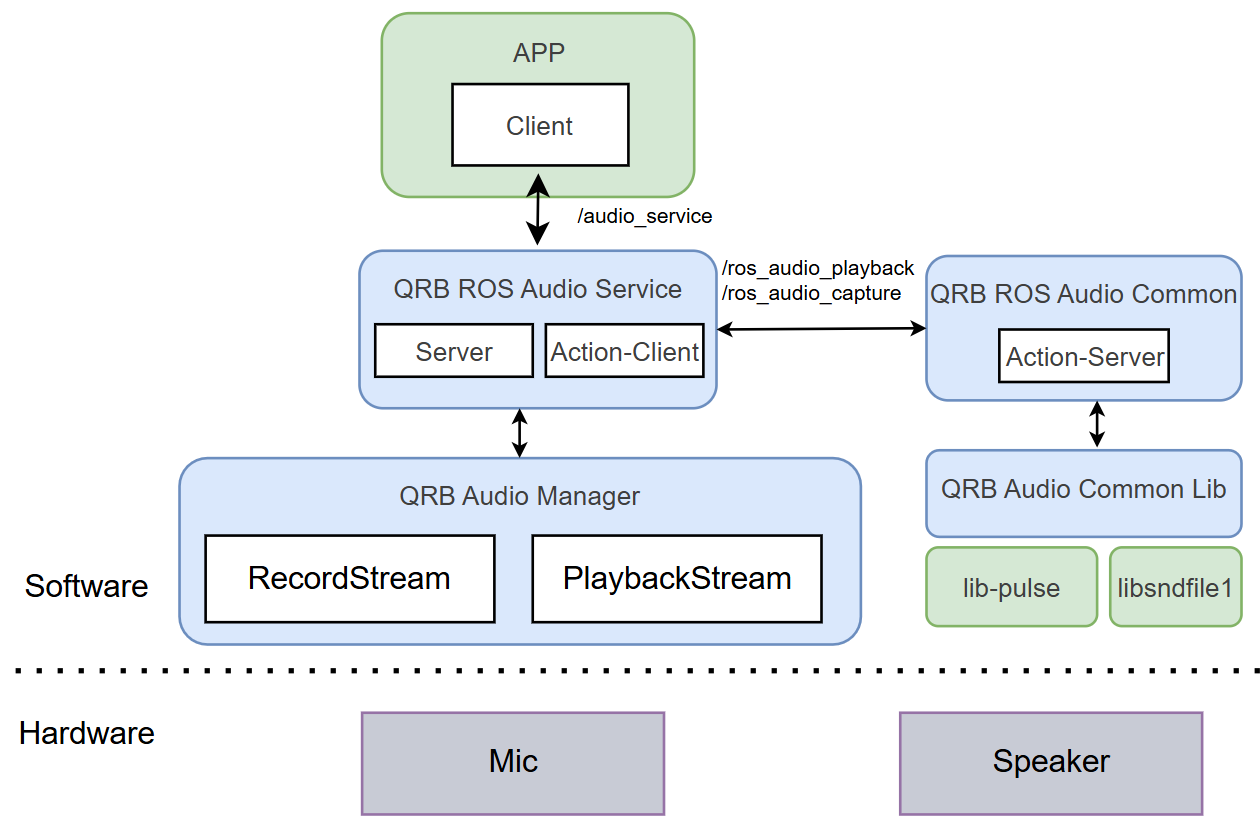
The qrb_ros_audio_service pipeline.
qrb_ros_audio_service APIs
The following table lists the ROS interfaces that qrb_ros_audio_service provides.
qrb_ros_audio_common APIs
The qrb_ros_audio_common package exposes ROS parameters, ROS interfaces, and the qrb_audio_common_lib APIs. Use them to set up playback and capture streams and to control them from your own node.
ROS parameters
The following table lists the ROS parameters ofqrb_ros_audio_common, with the type, description, and default value of each parameter.
ROS interfaces
The following table lists the ROS interfaces ofqrb_ros_audio_common, with the name, type, and purpose of each interface.
qrb_audio_common_lib APIs
The following table lists the qrb_audio_common_lib APIs, with the parameters and behavior of each function.
Prerequisites
You have set up the device, installed ROS2 Jazzy and the Qualcomm Intelligent Robotics (QIR) SDK on the device according to Install the QIR SDK.Run out-of-the-box qrb_ros_audio_service
1
Install the qrb_ros_audio_service packages
Install the packages
2
Launch the qrb_ros_audio_service node
a. Terminal 1: Audio common packageb. Terminal 2: Audio service
3
Push a music file to a device path
Push a music file to a device path, for example,
/tmp/xxx.wav.4
Play the music
a. Get the b. Choose one of the following actions to test the audio service.
audio_service_test.py script for music recording and playback.-
Step-by-step playback (output the sound through the speaker).
-
Step-by-step record (record sound input from the mic and save to a file).
-
Streaming playback.
-
Streaming record.
If you start streaming playback and streaming record the sound will loopback from the mic to the speaker.
Build from source
1
Install dependencies
Install the dependencies
2
Download the source code and build with colcon
Build the packages
3
Run and debug
Run the test script