

qrb_ros_video sample application provides the following features:
- Hardware-accelerated H.264/H.265 video encoding and decoding using the Qualcomm video processing unit (VPU)
- Zero-copy memory management for high-performance video processing
- Integration with ROS 2 ecosystem and camera pipelines
- Support for real-time video streaming and file I/O operations
Pipeline flow for qrb_ros_video
The following figure shows the pipeline flow for qrb_ros_video.
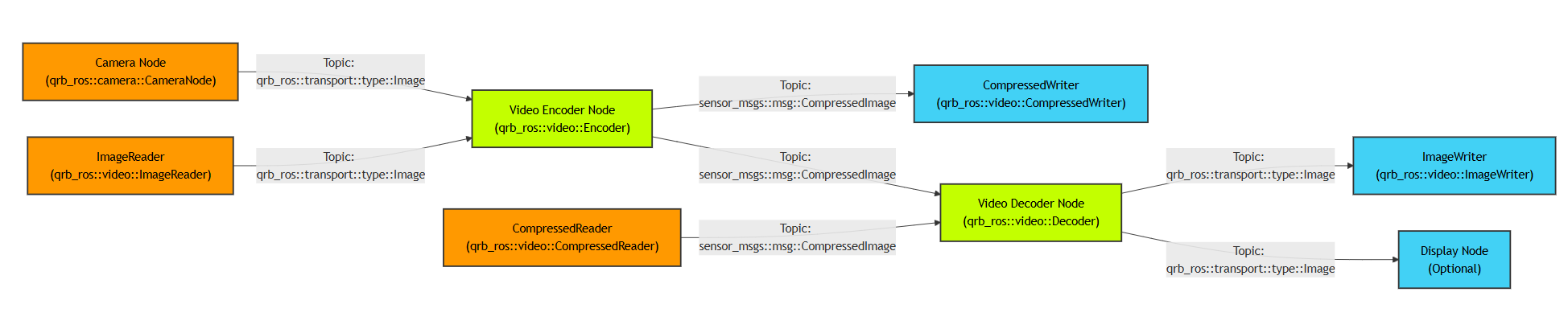
The qrb_ros_video pipeline.
- Video encoder node: Converts raw images to compressed H.264/H.265 streams using Qualcomm VPU hardware.
- Video decoder node: Decodes compressed video streams back to raw image frames.
- Camera support: Accepts input from the QRB ROS Camera package with zero-copy transport.
-
File I/O components: Implements
CompressedWriterandImageWriterfor saving video data to files. - Hardware acceleration: Leverages Qualcomm Video Processing Unit (VPU) for efficient encoding/decoding.
-
Memory management: Uses DMA buffers and
qrb_ros_transportfor zero-copy operations.
qrb_ros_video APIs
The qrb_ros_video node exposes ROS interfaces and ROS parameters. Use them to feed frames to the encoder or decoder and to configure the video format.
ROS interfaces
The following table lists the encoder topics, with the message type and content of each topic.
The following table lists the decoder topics, with the message type and content of each topic.
ROS parameters
The following table lists the video encoder parameters, with the type, default value, and purpose of each parameter.
The following table lists the video decoder parameters, with the type, default value, and purpose of each parameter.
Prerequisites
- You have set up the device, installed ROS2 Jazzy and the Qualcomm Intelligent Robotics (QIR) SDK on the device according to Install the QIR SDK.
- You have connected the device to the display monitor.
Run out-of-the-box qrb_ros_video
1
Install the qrb_ros_video packages
Install the packages
2
Start the local video file recording
Start the encoder
3
Start the local video file playback
Start the decoder
Build from source
1
Install dependencies
Install the dependencies
2
Download the source code and build with colcon
Build the package
3
Run and debug
Run the encoder